

Drag-and-drop file import
Drag your files straight into a document to bring their content in. .txt, and .md files are inserted with their formatting, a .csv becomes a table, a .url becomes a link, an .ics becomes a meeting and a .vcf becomes a contact block. An .eml file creates an attendance table from its recipients. Other files, such as PDFs and Word documents, are added as attachments with a mention in the document.Attendance blocks now merge automatically when they follow each other, so importing contacts no longer leaves you with several separate blocks. A new option lets you split them manually, above or below.Transfer notes between organizations
Move a note from one organization to another, just like documents. The note leaves its original organization without leaving a copy, and keeps its content, audio, transcript, media and history. Only the note’s creator can move it, to an organization they belong to, and only once the note is complete.After the move, the note becomes private again: access from the previous organization, invitations and share links are revoked. A confirmation warns you about the loss of access when the note is shared.Improvements
Improvements
Fixes
Fixes
Folder suggestion ahead of a meeting
Ahead of a scheduled meeting, There can now suggest recording your voice note directly into the right folder, from the mobile app. The suggestion appears at the right moment: tap it to start recording with the note already attached to the folder, or swipe to dismiss it.Advanced note filters on mobile
Find your notes more easily in the mobile app with new filters: status, visibility, creator, folder, source, and creation or update date. A badge shows how many filters are active, and you can now change a note’s status directly from the editor toolbar, without going back to the list.Improvements
Improvements
Fixes
Fixes
Task priority
You can now set a priority on your tasks: urgent, high, medium, or low. An urgent priority displays in red, with the same visual treatment as an overdue date. AI·there can also set this priority for you.New AI models: GPT-5.6 and Gemini 3.8 Flash
The models powering AI·there have been updated to GPT-5.6 and Gemini 3.8 Flash. This update covers all of There’s AI features, from the writing assistant to the there agent.Improvements
Improvements
Fixes
Fixes
New default style and brand import
New documents now get a polished heading style from the moment they’re created: numbering, colored underline or highlight for H1 through H4. This style applies automatically to new organizations and to documents without a custom style, without ever overwriting one that’s already set. A button lets you reset the style back to these defaults at any time.You can also import your company branding directly from the Style menu: just provide your website, and There automatically fetches the matching logo, colors, and font. Multiple logos can be imported and easily reused in page headers.Search in AI⋅there
AI⋅there can now search directly across your documents and notes to answer your questions, without needing to specify where to look. Search results also display note titles, making them easier to identify at a glance.Improvements
Improvements
Fixes
Fixes
Search across documents and notes
Find your documents and notes more easily with a new search field available from the sidebar. Search works by keywords across titles and content, with filters to narrow results down to documents or notes. This is now available for all organizations.Improvements
Improvements
Fixes
Fixes
Proof PDF
Generate a proof PDF report covering a shared document’s full history: every email related event (received, opened, failed, marked as spam) and every document event that occurred after locking (opened, signed, commented, downloaded, attachments downloaded) is logged. The PDF embeds a fingerprint of the content at the moment of locking, guaranteeing that the tracked document hasn’t been altered since.Document sorting
Sort your documents in the sidebar tree using three modes: manual, date, or alphabetical (A-Z). The sort mode is a personal preference, specific to each user.Completion & Quantity block
Add an expected quantity target on your tracking rows, for example to compare headcount present against headcount planned, or a material count against an order. The expected value displays alongside the entered value, with a graphical representation of completion in addition to the text display. Editing stays as simple as today, directly inline.Improvements
Improvements
Fixes
Fixes
Voice notes improved
Summaries for notes linked to a folder are now more reliable and actionable: participants, company names, and lots are better recognized, topics are categorized more precisely, and the points to update are presented as tasks, with the trades and companies involved, start and due dates, in the order they came up during the meeting and, where possible, under the same headings as the linked meeting report, with each participant’s position stated clearly in case of disagreement. To try it now, simply link an existing note to an existing folder: transcription and summarization will automatically restart with these improvements.Recipient grouping by company in tracking
Recipients are now grouped by company and phone number in the tracking view when the document contains an attendance block, making it easier to follow up with everyone at the same contact or company at once.Improvements
Improvements
Fixes
Fixes
A redesigned sharing email
Sharing emails now pick up your company’s colors and logo, for a more professional look that’s always on brand.A new preview feature lets you see exactly what the email will look like before it’s sent. And a proof-of-sending receipt now keeps a record of the recipient list, the email content, and the PDF as they were at the moment of sending.Send documents from your own Gmail
Connect your Gmail account in settings to share documents directly from your own Gmail address. As with Outlook, sending from your own mailbox means losing read tracking, automatic reminders, auto-lock, scheduled sending, and guest comments. This feature is available from the Business plan.Duplicate a task across multiple companies
A task involving multiple companies can now be created once and duplicated to each of them, keeping the original status, dates, and reference. Each duplicate remains identifiable through a source indicator, making it easy to trace back to the original task.Improvements
Improvements
Fixes
Fixes
Automatic blue highlighting for new content
When creating a follow-up document, new task text is automatically highlighted in blue. This makes it easier for stakeholders to spot what has been added since the previous document.Plan updates
PDF export is no longer included in the free plan. In return, document styling with your own colours, font, and document header is now available for free.Sharing documents with stakeholders for viewing is also free. The choice of language models is now available from the Team plan, in both Ask AI and the AI⋅there agent.Improvements
Improvements
Fixes
Fixes
Send your documents from Outlook
Connect your Microsoft account to There to send your documents directly from your own Outlook address, instead of a generic There address. Your recipients get an email that genuinely comes from you, retrievable in your Outlook sent mail as proof of sending.In exchange, per-recipient read tracking isn’t kept. This feature is available starting with the Business plan.Improvements
Improvements
Fixes
Fixes
New mobile app
The There mobile app has been redesigned from the ground up: a new home screen with a simplified navigation bar, a welcome screen for new users, a reworked note creation flow, and a redesigned notes list for more clarity. Audio recording now uses a new floating bar that stays visible in the background while you keep taking notes. Download the new appShare your documents from your own mail client
You can now share a document directly from your own email client (Outlook, Apple Mail, Gmail…) instead of going through There. Just click on the sender to switch to your own mail client. The email opens pre-filled with the list of recipients marked for distribution in the report, letting you draft the message with AI assistance and then insert the sharing link directly, a more efficient approach than attaching a PDF. A There link keeps mailboxes lighter, cuts down on unnecessary copies, and is easier to read than a PDF.Sending from your own mail client does mean giving up a few There features: read tracking, guest comments, automatic reminders, scheduled sending, and automatic lock.On top of that, a new button lets you copy the sharing link in one click. Integrations (OneDrive, Mezzoteam, Resolving, Kroqi) have been folded into the share window for a single, unified interface: a ”+ Set up an integration” button lets you enable them directly from there. These integrations remain available from the Business plan.Improvements
Improvements
Fixes
Fixes
OneDrive Integration
Send your there documents directly to OneDrive. From the sharing panel, export your document as a PDF and deposit it into a OneDrive folder in your organization, in a single action without leaving the app.This integration is available from the Business plan.Comments Closer to the Content
Comments now appear directly in the margin, anchored to the content they refer to. Close the side panel to see them displayed next to the document, as close as possible to the commented text or block.You can also select multiple blocks at once to attach a single comment spanning the entire selection. User suggestions when using mentions (@) have been improved to find collaborators more easily. Comments do not affect revision tracking: adding or resolving a comment is not counted as a content modification.Improvements
Improvements
Fixes
Fixes
Comment Improvements
Comments gain three new capabilities. Set a comment’s visibility: internal, restricted to members with editing rights, or public, accessible to all document recipients. Mention a collaborator with @ to send them an email notification directly from the comment thread. When duplicating a document, unresolved comments are automatically copied along with the content.One-Click Note Sharing
Clicking the share button on a note automatically copies the public read-only link to your clipboard. Available on web and mobile.Improvements
Improvements
Fixes
Fixes
Follow-up panel
The follow-up panel has been fully redesigned. Your sends are now grouped as a list in the Activity section — click any entry to view the email exactly as your recipients received it.Scheduled sends remain editable from this panel: you can update their content, reschedule their delivery, or cancel them before they go out. Automatic follow-ups are also visible and manageable in the same place.Improvements
Improvements
Fixes
Fixes
Automatic block pre-filling
Type/ to insert a pre-filled block from a group (e.g. companies), a project’s appendices, or any list values: table, progress block, quantity block. Rows are generated all at once — nothing to fill in manually.In a table, enter a value on one list entry — a selector, a date — and There suggests applying it across all rows: each entry inherits the same field, ready to be filled in.New shortcuts: /Headcount, /Status, /Penalties and /Agreement to generate the corresponding block directly from the attendance block.Image rotation in gallery blocks
You can now rotate photos directly inside a gallery block. After inserting an image, a rotation option is available from the image menu, with no need to edit the file beforehand.Document transformation as a service
A new option is now offered when creating a document: transform an existing meeting report into the there format. The first transformation is free. Additional ones are available through a 99 € offer, accessible directly from the product.Improvements
Improvements
Fixes
Fixes
Share a note the easy way
A new Share button is now front and center on mobile. Send a site visit report or meeting notes to your contacts in seconds — whether they have a there account or not.Sharing has been completely redesigned: read or write access for members of your organization, and a shareable link with no account required for anyone outside it.Redesigned PDF export
PDF exports are now more compact and easier to share. Tighter typography, optimized margins, refined spacing: every page is denser without any loss of readability. The improvements apply automatically to all your exports.AI⋅there — Enriched context
AI⋅there can now include document attachments in its context — just use@ to reference them, the same way you would any other document. Other documents in your organization can also be added to the context the same way.The list of available AI models has been simplified to focus on the most effective options, particularly for agentic tasks.Appendices
Attachments are now called appendices. You can create an appendix directly from a link (a there.do document or any external URL) and reference it in your document with@appendix. The section previously called “Files” has been renamed “Appendices”.Note templates on the web
Select a template to pre-fill your note directly from the web. Templates let you get started faster by applying a predefined structure to your document. To create or customize your templates, go to your organization settings and open “Note templates”.Improvements
Improvements
Fixes
Fixes
AI⋅there — More Precise and Reliable Edits
AI⋅there becomes more precise and reliable in how it reads and modifies your documents.Differences between the original content and proposed changes are now displayed more clearly, making it easier to review before accepting. The assistant can now assign groups to tasks directly from an instruction, and reference existing tasks in the document rather than creating duplicates.Presence Block — Compact View and Absence Tracking by Group
The Presence block now has a cleaner, more readable layout. Email and phone number appear on the same line, making the block easier to scan, closer to a simple directory.A new unified button brings together attendance status updates, distribution management, invitations or summons, and absences, all in one place.It is now possible to count absences and late arrivals by company group rather than by individual contact. This becomes the new default for new blocks. For existing blocks, go to the block options, then “Absences and late arrivals” > Calculation method > “By group”.Improvements
Improvements
Fixes
Fixes
@Reminder in documents
You can now create reminders directly in your documents by typing@reminder. A menu lets you choose between different levels: simple reminder, x2, x3, or penalizable delay. Reminders are displayed in red and bold from x2 onwards, making it easy to spot items that need your attention.This feature is especially useful in follow-up documents: each time a new continuation is created, the reminder is automatically carried over and its indentation date updated. You can track the evolution of a commitment over time, continuation after continuation.Redesigned onboarding
The onboarding flow for new users has been completely redesigned to put the mobile app at the heart of the experience. From account creation, you’re guided to download the app and personalize your workspace with your organization’s colors and logo, with the option to skip these steps if needed.Improvements
Improvements
Fixes
Fixes
Start a document faster
When creating a new document, several options help you choose the right starting point: use AI to get a first draft from a description, pick a template with ready-to-use layouts, import a .docx file, or start from a blank page.The templates entry makes it easy to reuse your usual structures and layouts without starting from scratch each time.Table grid customization
Fine-tune the look of your tables by adjusting border thickness and color, or hiding vertical lines. These options are designed for teams who need tables better suited to printing and their visual guidelines.Folder icons and colors
Customize the appearance of your folders by assigning an icon and a color. From the navigator, hover over a folder, click ”…” then select “Rename” to access the icon and color picker.Improvements
Improvements
Fixes
Fixes
Kroqi Integration
Share your documents and meeting reports from there directly to Kroqi in just a few clicks. The integration makes it easy to send your content to your Kroqi workspace without leaving the app. Learn moreImprovements
Improvements
Fixes
Fixes
Collect notes from WhatsApp
Send a WhatsApp message to create private notes in there. Texts, photos, and voice memos are automatically converted into notes in your organization. Messages sent within the same hour are grouped into a single note.To get started, verify your phone number in your there profile, then scan the QR code from the Notes tab. Learn moreDocument tagline and sub-title
Add a tagline and a sub-title to your document title. These elements appear directly in the document header, giving context to your content from the very first glance. Learn moreImprovements
Improvements
Fixes
Fixes
Save photos to camera roll
From the mobile app (v0.10), photos in your notes can now be saved directly to your phone’s camera roll. Enable this option in the app settings, under Save photos to library.Add a note to a folder from mobile
Link your notes to a folder directly from your phone to find them more easily. From a note’s detail view, an “Add to…” button lets you select the destination folder. From the notes view, filter by folder to quickly access all related notes.If a note is already linked to a folder, you can move or unlink it in just a few taps.Dark mode on mobile
The mobile app now automatically adapts to your phone’s display theme. Switch your device to dark mode for a more comfortable experience, day or night.New heading styles
Customize your headings further with new style options. You can now add a border above or below your headings, spanning the full page width, and pick its color from your custom color palette.This option is available via the “Customize” button in the heading style settings, in the same place as the numbering options.Resolving integration
there now integrates with Resolving, the document management system used in construction and engineering. From the extended sharing menu, send your documents directly to Resolving: select the project, entity type and fill in the required fields. The PDF is automatically generated in Resolving.To activate the integration, go to your settings via Integrations and connect your Resolving account using your API key. Learn moreImprovements
Improvements
Fixes
Fixes
Create a note from a forwarded email
Forward any email to there to automatically turn it into a note. The message text and inline images are imported and structured in the editor, ready to be annotated or expanded.To enable this feature, go to the Notes page on the web platform, click Import notes in the top right corner, and select Email. You’ll get a unique email address that lets you create private notes directly from forwarded emails, perfect for collecting information or capturing photos.GPT-5.4
there now uses GPT-5.4, OpenAI’s latest model. It brings meaningful improvements in reasoning, instruction following, and output quality, resulting in more accurate and consistent results when using AI⋅there features.Improvements
Improvements
Fixes
Fixes
Organize Notes into Folders and Documents
Organize your notes directly from the web interface. Use the ”…” context menu on any note to attach it to a folder or document and keep your workspace structured.New filters make it easier to find your notes: filter by folder, or use the Triage quick filter to surface notes that are not yet completed or not yet filed. Especially useful if you use notes as a collection area before producing a document — spot at a glance what still needs to be processed or organized.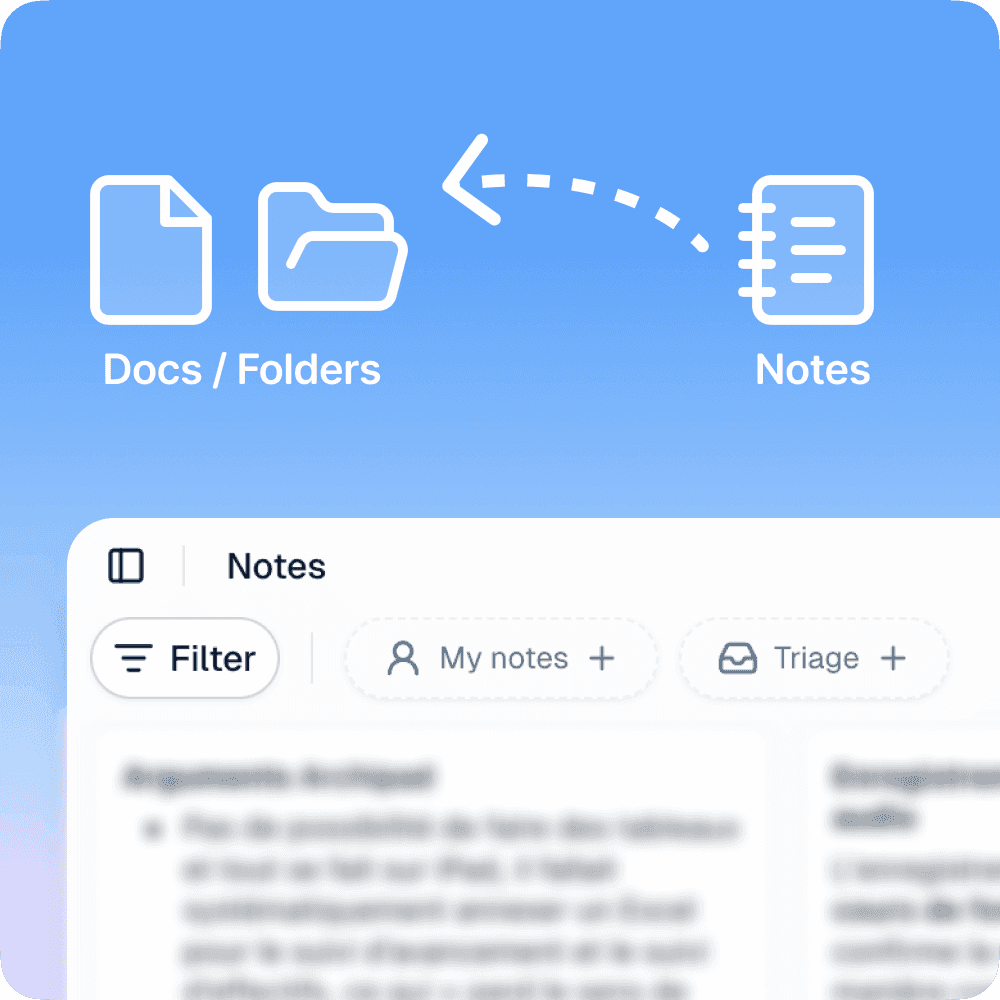
Note Templates on Mobile
Set up your note templates from the organization settings, then select them directly on mobile before creating a note. Templates let you start with a predefined structure suited to your recurring workflows: reports, field visits, team meetings.Improvements
Improvements
Fixes
Fixes
Photos and captions in your voice notes
When taking a voice note with photos, images are now inserted at their chronological position in the summary. If you were speaking when you took the photo, your voice comment automatically becomes the photo caption.The AI now more effectively combines your manual notes, voice transcription, and contextual audio to produce clearer, better structured notes. Available in version 0.9.0 on iOS and Android.Import Word documents (.docx)
Import Microsoft Word files directly into there and convert them into native documents. Simply drag a.docx file from your computer to create a new document, with all content converted automatically.The import preserves text and highlight colors, heading levels, and the overall document structure. When a single level-1 heading is detected, it becomes the document title automatically. Heading levels are rationalized to integrate cleanly into there’s table of contents.More freedom in document layout
Two improvements expand layout possibilities without sacrificing there’s simplicity.The document title is now optional and can be positioned freely: place it anywhere in the document, add content above it, or remove it entirely to start directly with your content.Single images now display at their original aspect ratio and can be resized manually. Adjust the width to match your layout without any imposed format constraints.Improvements
Improvements
Fixes
Fixes
New documentation
Our documentation is now available at docs.there.do. You’ll find feature guides, feature availability by plan, and resources to get started. Content will continue to grow with each upcoming release.View the new documentation →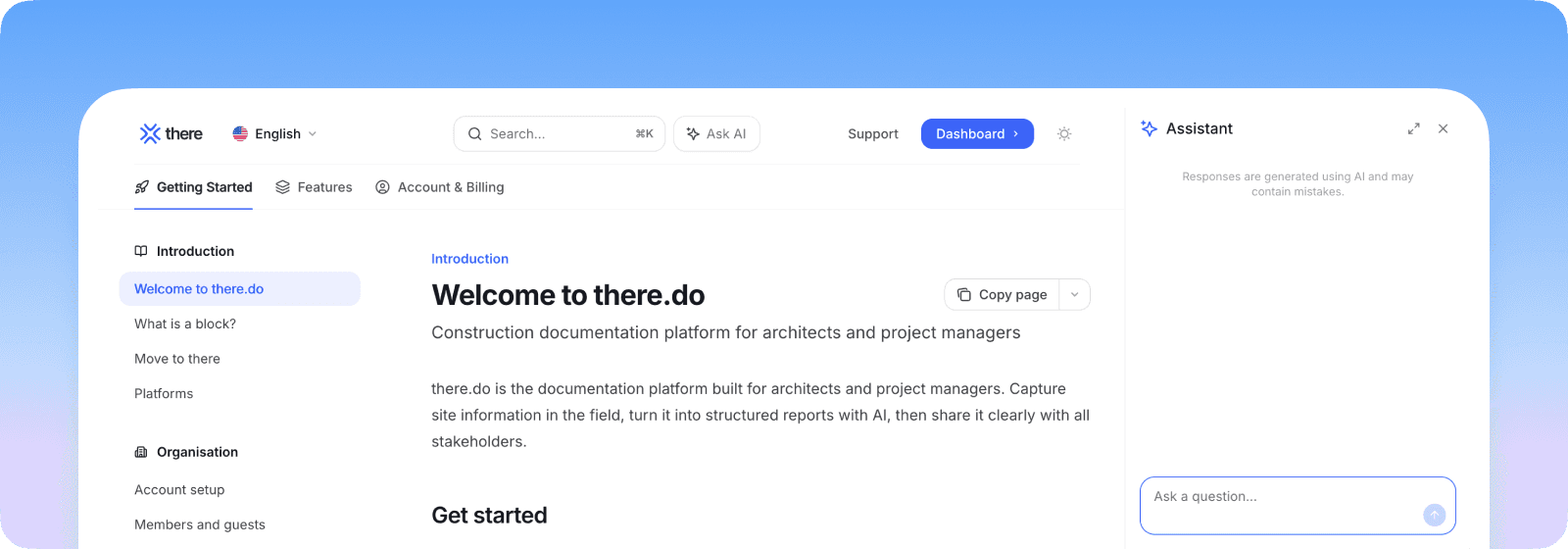
General performance improvements
We continuously monitor and improve app performance. This update includes background optimizations that contribute to a smoother day-to-day experience.Improvements
Improvements
Fixes
Fixes
Task numbering and organization
Organize your tasks more efficiently with two complementary new features. Each task now receives an automatic unique identifier in document-number format (for example 148-01 for the first task in document 148), making it easier to track and reference in team communications. To enable this numbering, go to the task block options and select the reference display mode.You can also reorganize your tasks by status with one click. Completed, in-progress, and pending tasks automatically group together, improving the readability of your documents and reports. This organization perfectly adapts to construction management and project tracking workflows.Mezzoteam integration
You can now send your there documents directly to Mezzoteam to automatically archive and share via the document management system. This integration simplifies distribution of your reports and site documents to all your partners. This feature is available starting with the Business plan.More generous free plan
Our free plan evolves to let you manage your projects without constraints. You can now create up to 5 documents per month, with deleted documents not counting toward this limit. This plan is ideal for managing a construction site completely free with there, at a rate of one site report per week.The free plan still includes unlimited users and voice notes, with AI transcription and summary included.Improvements
Improvements
Fixes
Fixes
Concerned companies in task blocks
In task blocks, you can now list the companies concerned by each task. This information is clearly displayed to quickly identify which stakeholders are impacted, particularly useful for construction site reports and technical questions requiring attention from multiple trades.You can select one or more specific companies, or check “All” to indicate that the task concerns all parties. To optimize space and speed up data entry, we recommend adding a trigram to your company group names (for example “ELE” for electrical, “PLB” for plumbing).New image annotation tools
Enhance your annotations with two new drawing tools:- Simple line – Draw straight lines to point out specific elements
- Polyline – Outline complex areas with multiple points
Improvements
Improvements
Fixes
Fixes
Team spaces to organize your projects
Create dedicated team spaces to better organize your documents by project. You can invite external collaborators directly into a space: they are automatically added with the new “Guest” role and have access only to that space and notes, without being able to see other organization documents.Team spaces allow you to compartmentalize your projects, easily invite partners or external contractors, and move documents between spaces using the “Move to” function. This feature is available from the Business plan.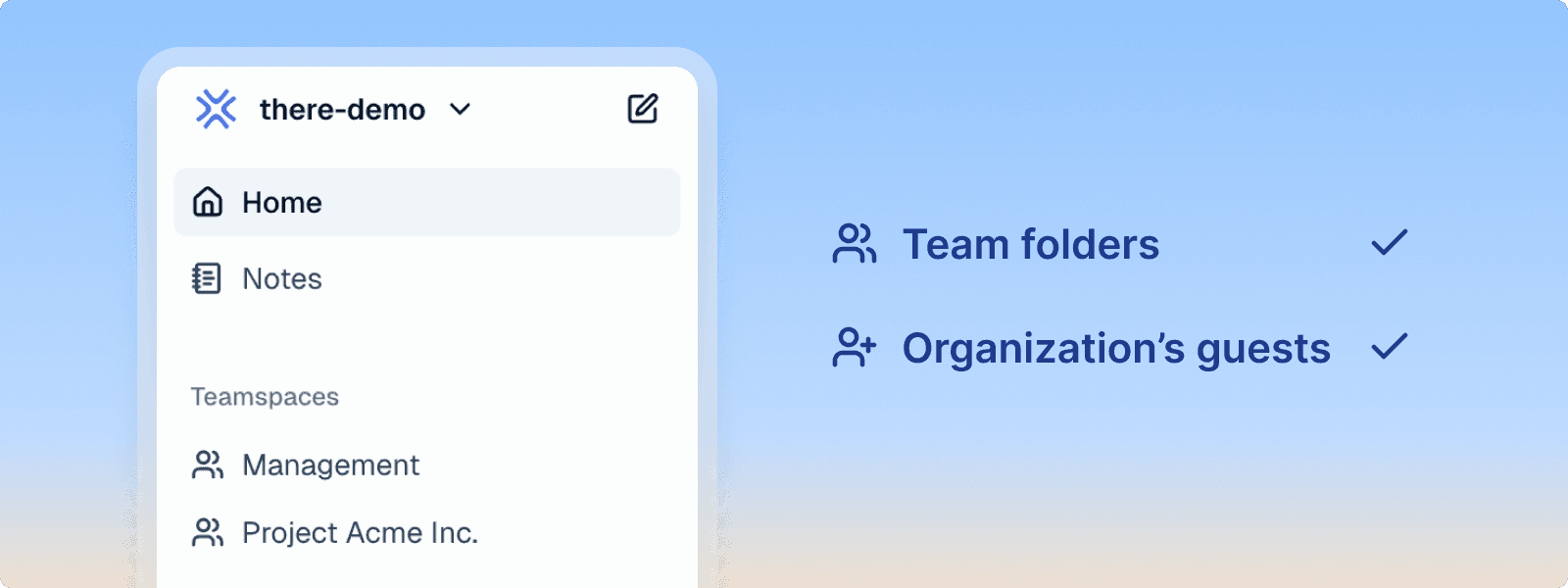
New Guest role with limited access
The new Guest role provides access only to notes, without access to organization documents. Guests create notes by default with organization visibility to facilitate retrieval by other members, while only being able to see their own notes and not those of other members.This role is ideal for field collaborators who collect information via notes, while office team members draft final documents. Guests have a home screen tailored to their needs.Voice note template switching
Easily switch between your different voice note templates from the web and mobile interface. You can now change templates at any time to adapt your voice note processing according to context.The system offers an automatic retry mechanism in case of failure during audio processing. Available from the Team plan.Improvements
Improvements
Fixes
Fixes
Floating navigation table of contents
Navigate instantly between document sections with the new interactive table of contents. Available in reading mode, this clickable table of contents is positioned laterally and provides quick access to any part of your document.The table of contents automatically adapts to your document structure and facilitates reading long documents by allowing you to jump directly to the desired section.Customizable email reply
Configure the reply-to email address and sender name when sharing your documents. This feature, reserved for the Team plan, allows project-organized teams to share their reports via dedicated email addresses rather than personal mailboxes.Set a custom reply-to address like ChantierXYZ@company.com and adapt the sender name accordingly. Changes are automatically validated to ensure email deliverability. This feature is available starting with the Team plan.Improvements
Improvements
Fixes
Fixes
Voice notes with custom templates
Create enriched notes from your voice recordings using custom templates tailored to your profession. Define your own prompts at the organization level to automatically generate structured reports, visit summaries, or any other document format specific to your business.Custom templates are configurable in organization settings and apply automatically when creating enhanced voice notes. This feature is available with the Team plan and above.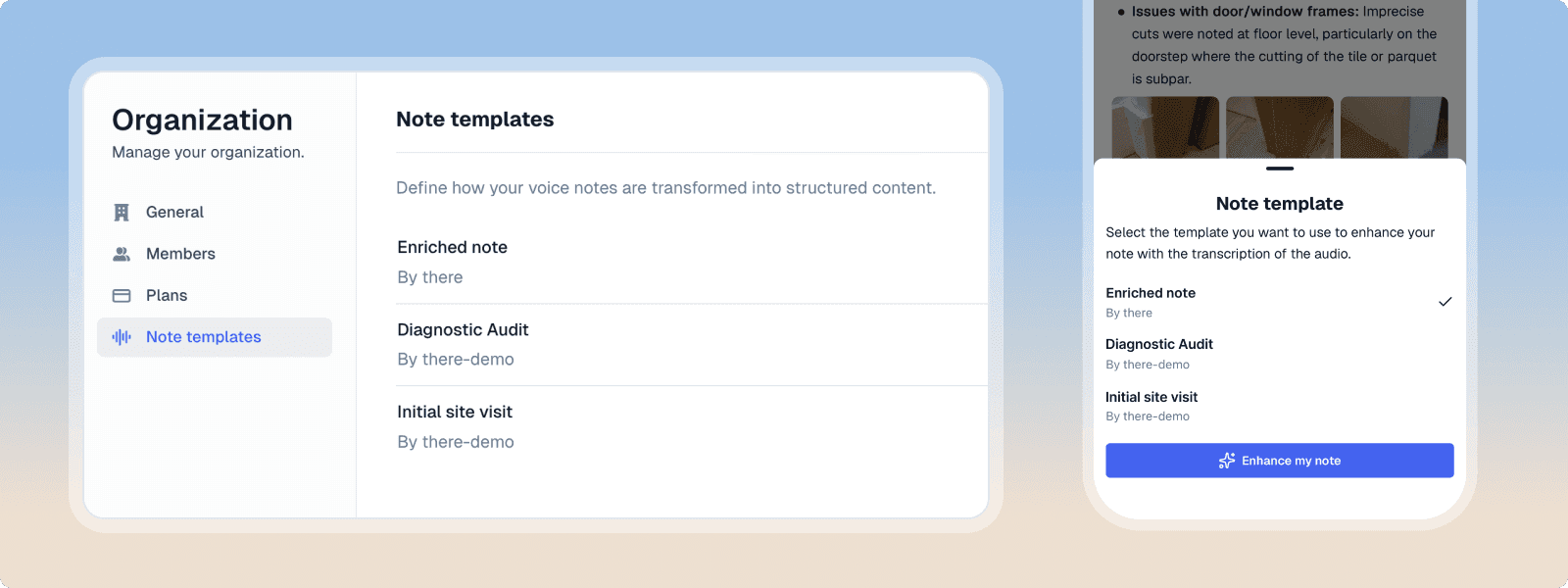
Improvements
Improvements
Fixes
Fixes
Automatic Organization Invitations
Simplify team onboarding with automatic domain-based invitations. During sign-up, users with an email address matching your organization’s verified domain automatically join it, without requiring manual invitations. Perfect for large organizations and growing teams, this feature eliminates administrative friction and ensures all collaborators immediately access shared organizational resources.This feature is available with the new Business plan.Business Plan
Our new Business plan is designed for organizations with advanced security and team management needs. It includes enterprise Single Sign-On (SSO) compatible with SAML and OIDC, automatic invitations via verified domain, and a capacity of 250 documents per month. This plan lays the foundation for upcoming advanced team features, including team folders for structured collaboration.Dark Mode
Dark mode is now available on there. Enable it by clicking your avatar in the top right, then “Manage account” > “Preferences”. The interface adapts to reduce eye strain during extended sessions, especially in low-light environments. You can choose between light, dark modes, or let the application follow your system preferences.Improvements
Improvements
Fixes
Fixes
AI⋅there: your AI agent for documents
AI⋅there (pronounced “Hi, there!”) is now available in beta for the Team plan. This AI agent understands your document context and helps you save time on repetitive tasks.Generate custom templates, merge your notes directly into your reports, or proofread and improve your documents. AI⋅there adapts to your needs: reformatting, summary generation, contextual suggestions. You stay in control with the ability to accept, reject, or modify each suggestion.Image annotation: text and custom colors
Two new tools enhance image annotation in galleries. The text tool lets you add text annotations directly on your images with precise control over positioning and style.The color tool offers a complete palette including your company colors, for annotations consistent with your visual identity.Gemini Flash 3
Integration of Google’s Gemini Flash 3, one of the best models available alongside Claude Haiku for getting started with AI⋅there. This model offers an excellent balance between speed and intelligence for your first AI experiences.Improvements
Improvements
Fixes
Fixes
Image Annotation
Annotate your images directly in the app with professional drawing tools. Add rectangles, circles, and arrows to highlight important elements in your visuals and facilitate communication.Annotations are non-destructive: you can always return to the original image or edit an existing annotation at any time. This feature is available for all images in galleries on the web.Optimized PDF Exports
PDF exports benefit from vertical space optimization for a more compact and professional layout. Your exported documents gain readability while maintaining their original structure.Feel free to let us know if you think we can improve exports even further!Improvements
Improvements
Fixes
Fixes
Enhanced headers and footers
New options enhance the customization of your headers and footers. Add custom text to include legal mentions, references, or personalized information, and choose between 1, 2, or 3 columns based on your layout needs. Text automatically aligns based on its position: left, center, or right.These options complement existing features for page numbering, date, title, and logo to create documents perfectly tailored to your professional needs.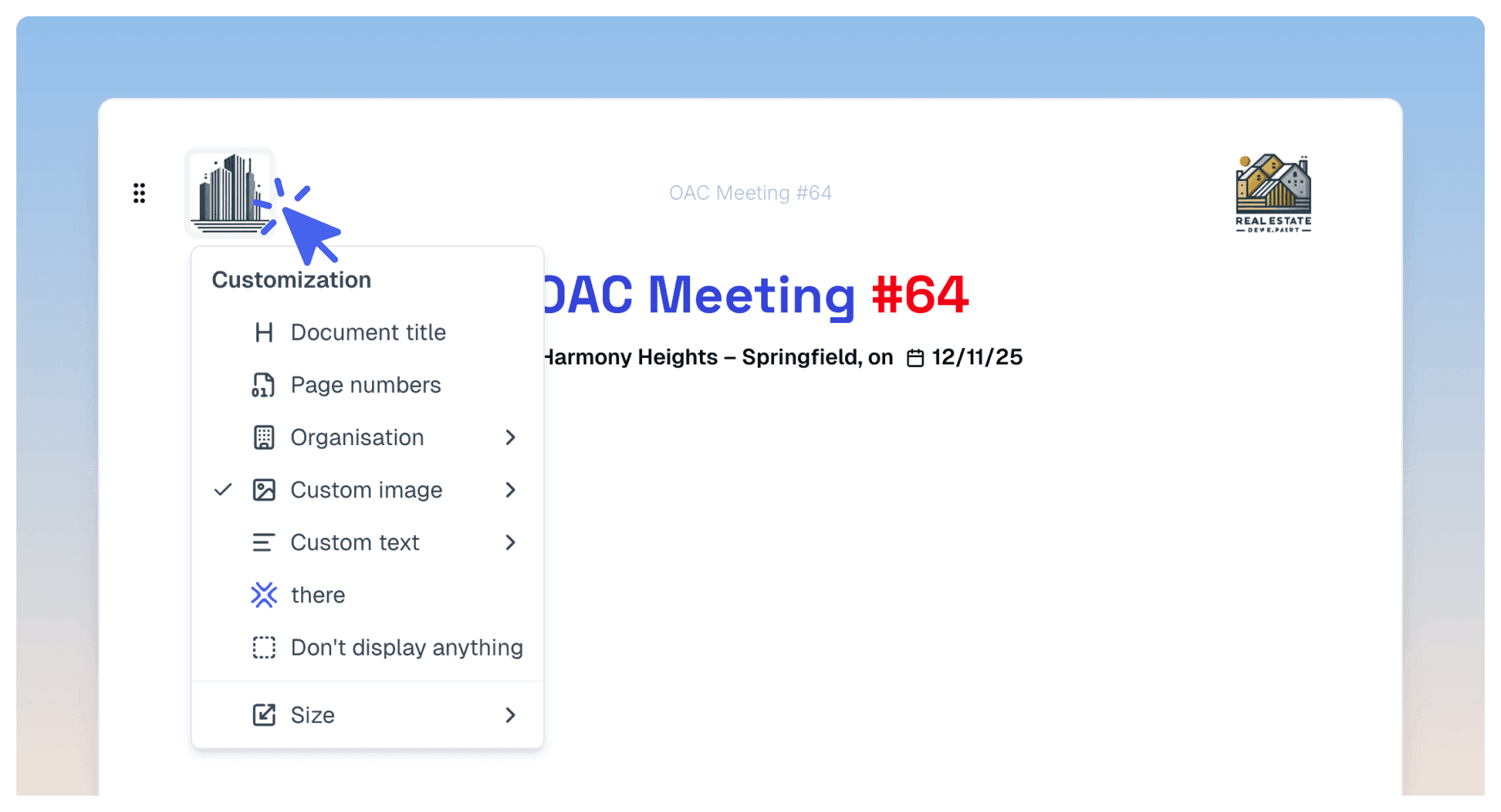
Advanced date management in Completion block
Choose how dates display in your Completion blocks according to your needs. Three options are now available in settings: no dates displayed for a clean view, a short date with delay indicator (D+xxx), or full display of all 4 dates (planned and actual) on 2 lines for detailed tracking.This flexibility lets you adapt the display to each context, whether you favor simplicity or precise project progress tracking.Improvements
Improvements
Fixes
Fixes
Create Next
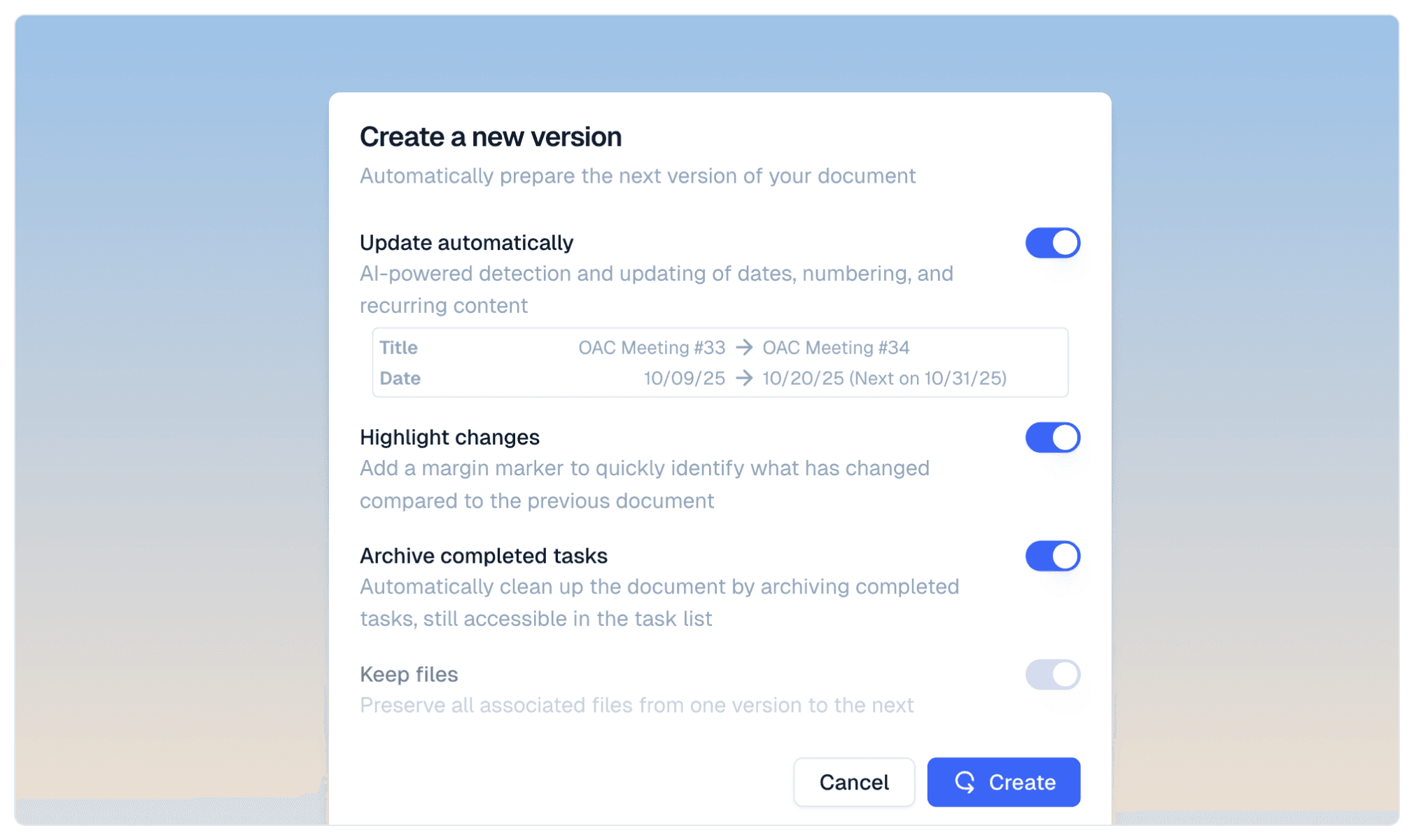
Automatically prepare the next version of your recurring documents with a single click. The “Create Next” feature intelligently detects and updates dates, numbering, and repetitive content using AI, saving you valuable time on successive reports.Changes made are clearly identified by a mark in the margin, making it easy to spot modifications from the previous document. Completed tasks are automatically archived to keep your document organized, while remaining accessible in the complete task list if needed.Files associated with your document are preserved from one version to the next, ensuring continuity of your references and attachments. This feature is ideal for teams producing regular follow-up documents who want to automate their processes. Available from the Pro plan onwards.Image Cropping in Galleries
Precisely adjust how your images are displayed directly in your documents. The cropping tool lets you reposition and frame your photos in gallery blocks, with the ability to respect the gallery’s display ratio for harmonious presentation.Cropping is non-destructive: you can undo your changes and start over, or adjust the position at any time with two clicks. This flexibility allows you to achieve the perfect visual result without risking the loss of the original image.Improvements
Improvements
Fixes
Fixes
Automatic document locking after sharing
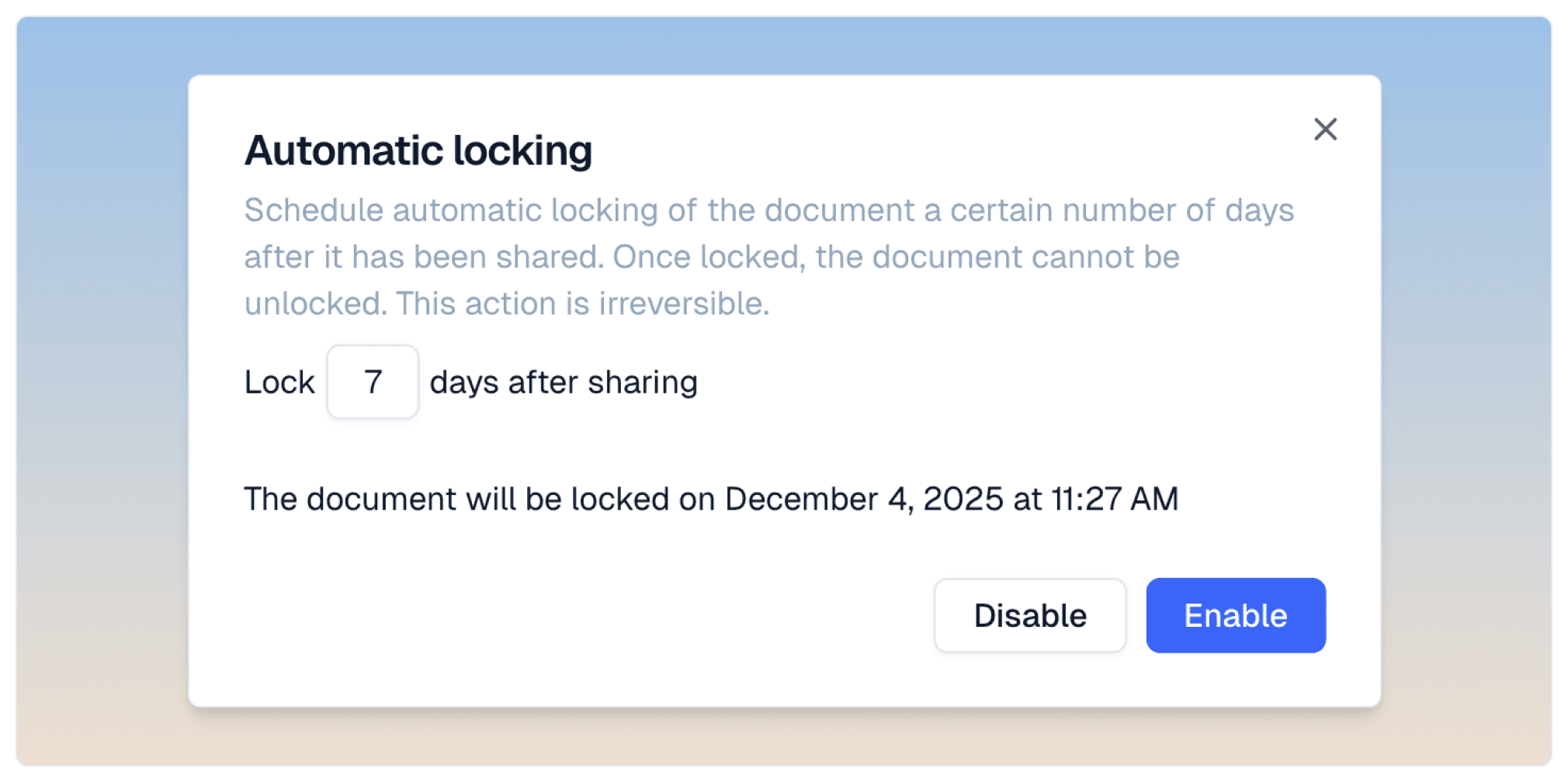 Protect your shared documents with automatic locking. This new option, configurable when sharing a document, automatically locks your documents after a defined delay (7 days by default).Once activated and the delay elapsed, the document becomes permanently locked. The locking is irreversible and also applies to attachments which become read-only. This feature ensures the integrity of your finalized deliverables and prevents accidental modifications after validation.
Gemini 3 Pro (Preview)
Access Google’s most advanced artificial intelligence model with Gemini 3 Pro Preview. Ranked first on the LMArena benchmark with a score of 1501 Elo, this model offers state-of-the-art reasoning with unprecedented depth and nuance.Gemini 3 Pro excels in multimodal understanding and acts as a true thinking partner. Its responses are intelligent, concise and direct, favoring insight over flattery. The model also demonstrates exceptional capabilities in code generation and visualizations, dominating the WebDev Arena leaderboard with a score of 1487 Elo.Performance improvements
We have significantly optimized application performance, especially for large documents and mobile usage. PDF generation optimization improves handling of documents containing many photos and reduces exported file sizes.On mobile, memory management has been completely redesigned to resolve slowdowns and crashes that could occur when taking many photos. These improvements will be available in the upcoming mobile version 0.6.1.Improvements
Improvements
Fixes
Fixes
Create next to identify new content
 When creating a next document, newly added content is automatically highlighted. Unlike a standard duplication, this feature makes it easy to identify changes between two versions.The highlighting system allows readers to immediately spot what has been added or modified, particularly useful for successive meeting reports or progress updates.
Experience Pro features for 2 weeks
Discover all Pro plan features for 2 weeks from your organization creation date. This trial period lets you explore complete brand customization with your custom colors and fonts, document header and footer configuration, professional signature addition when sending emails, and AI model selection tailored to your needs.After 2 weeks, you decide if these advanced features match your usage. Without a subscription, your account automatically switches to the free plan.GPT-5.1 support
there.do now integrates OpenAI’s GPT-5.1 for improved content generation. Pro plan users can select this new model in their AI settings.Improvements
Improvements
Fixes
Fixes
Custom email signature
Personalize your sharing emails with a professional signature. Create your signature in the organization settings with your contact information, company logo, and details. Your signature will be automatically applied when sharing documents by email.The signature can be modified at any time when you share a document, and changes are automatically saved. A reset button allows you to quickly return to default values. This feature is available starting from the Pro plan.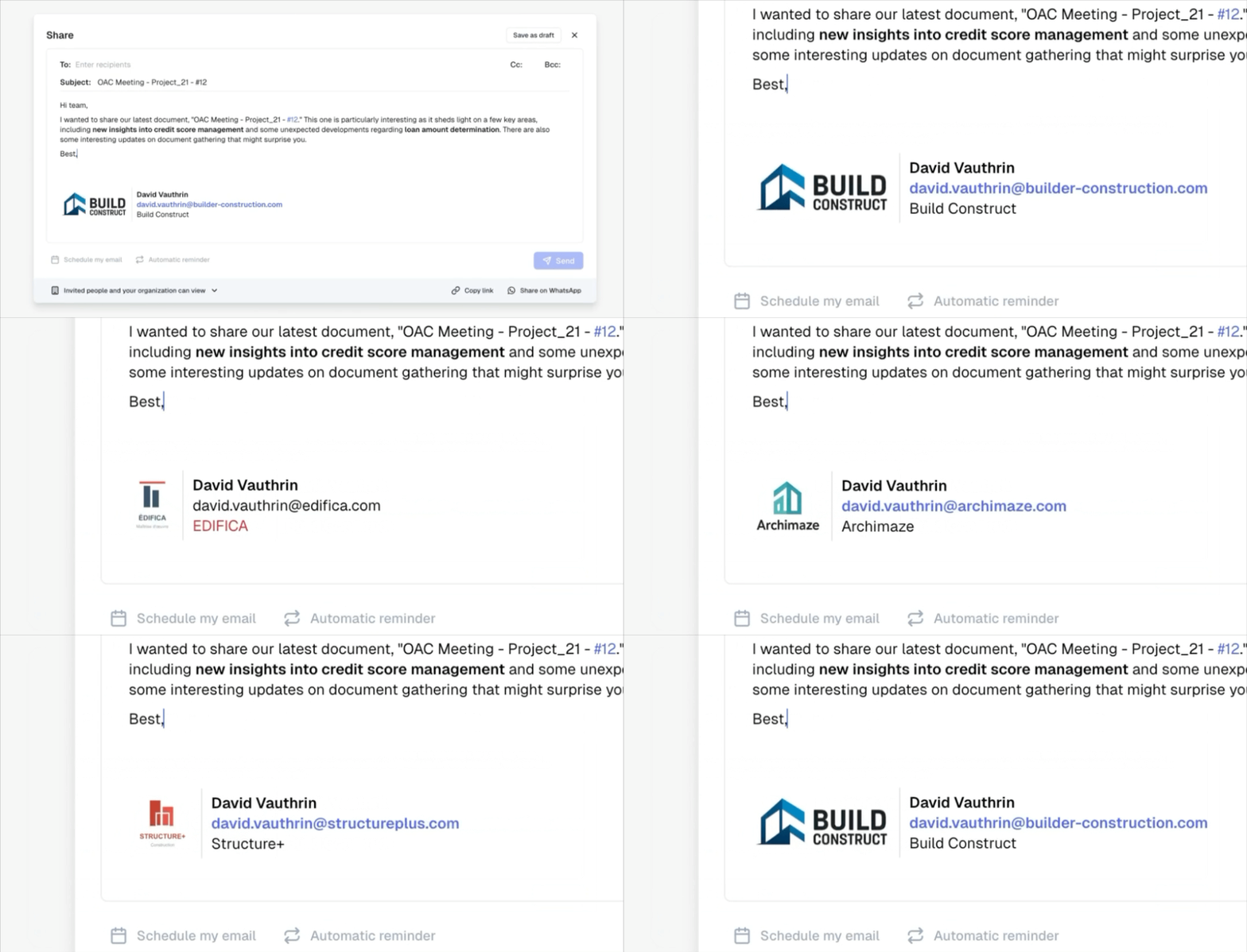
Archive completed tasks
Keep your documents organized by hiding completed tasks. When duplicating a document, archived tasks remain hidden by default, allowing you to start fresh while preserving the complete history.You can display archived tasks or unarchive them at any time in case of error. Archiving improves readability without losing any information.Improvements
Improvements
Fixes
Fixes
Automatic title numbering
Structure your documents with automatic title numbering. Enable numbering from any title or from the Style menu accessible via the ”…” button at the top right of the document. Choose which title levels to number: H1, H2, H3, or H4, according to your needs.Numbers adjust automatically when you reorganize your content, ensuring a consistently coherent and professional structure. This feature is available starting from the Pro plan.Custom title colors
Set your title color once and it will be automatically preserved. No more repeating formatting for each new H1 title – your main color is memorized and applied automatically.You can also now customize the text color of image captions, particularly useful for highlighting new remarks in your reports. This feature is available starting from the Pro plan.New pricing plans
Discover our new Pro, Team, and Enterprise plans with unlimited users. These new plans offer you more flexibility to grow your teams without constraints. The document quota is shared among all users in the organization.Improvements
Improvements
Fixes
Fixes
Planned and actual dates in Progress block
Track your project progress precisely with planned and actual dates. Add for each progress category:- Planned start date and planned end date
- Actual start date and actual end date
Claude Haiku 4.5
Upgraded to Anthropic’s new Claude Haiku 4.5 model. This model offers improved performance for all your AI interactions: content generation, text improvement, summaries, and suggestions. Enjoy faster and more relevant responses in all your AI-assisted workflows.Improvements
Improvements
Fixes
Fixes
Custom fonts
Add your own fonts to your documents to respect your brand guidelines. Import custom fonts like Century Gothic, Neue Helvetica, DIN, or Calibri directly from organization settings.Your documents can now perfectly reflect your visual identity with your brand’s typography. Ideal for companies that want to maintain visual consistency across all their professional documents. This feature is available starting from the Pro plan.WhatsApp sharing
Share your documents directly via WhatsApp for more fluid and informal communication. A new WhatsApp share button lets you send your reports and documents to your contacts in one click.Perfect for quick exchanges on construction sites or with collaborators who prefer WhatsApp for their professional communications.Improvements
Improvements
Fixes
Fixes
Document title color and alignment
Customize your document titles with colors and alignments. You can now format the main title of your document like any text: change the color, adjust the alignment (left, center, right), for a visual rendering adapted to your needs and brand guidelines.This new flexibility allows you to create even more professional and customized documents.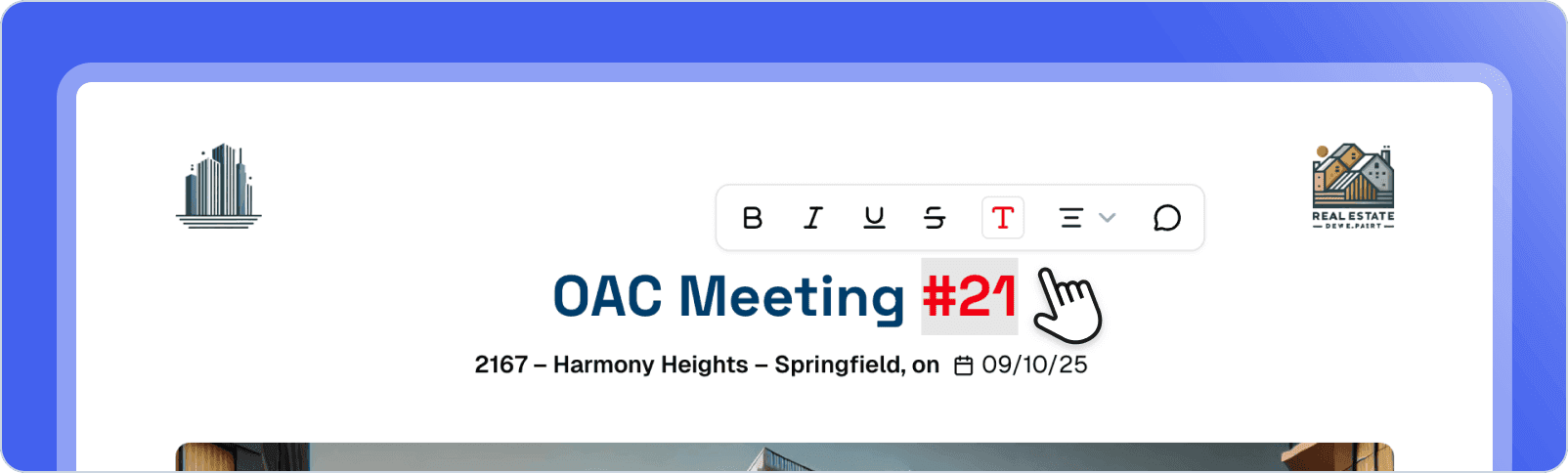
Performance optimization
Major interface performance improvement for an even smoother experience. Optimization of layout rendering, editor CSS calculations, and general application display.Navigation between pages, document editing, and all interactions are now significantly faster, especially on large documents.Claude Sonnet 4.5
Upgraded to Anthropic’s new Claude Sonnet 4.5 model. This state-of-the-art model offers even superior performance for all your AI interactions: more creative content generation, more relevant text improvement, more accurate summaries, and smarter suggestions.Enjoy enhanced response quality for all your AI-assisted workflows in There.Improvements
Improvements
Fixes
Fixes
@Person and @Company mentions
Easily mention people and companies in your documents. Type @ followed by a name to create a link to a contact or company. Mentions are automatically created from the attendance block and can be used throughout the document.Ideal for quickly referencing participants, subcontractors, or companies mentioned in your reports, with automatic suggestions during typing.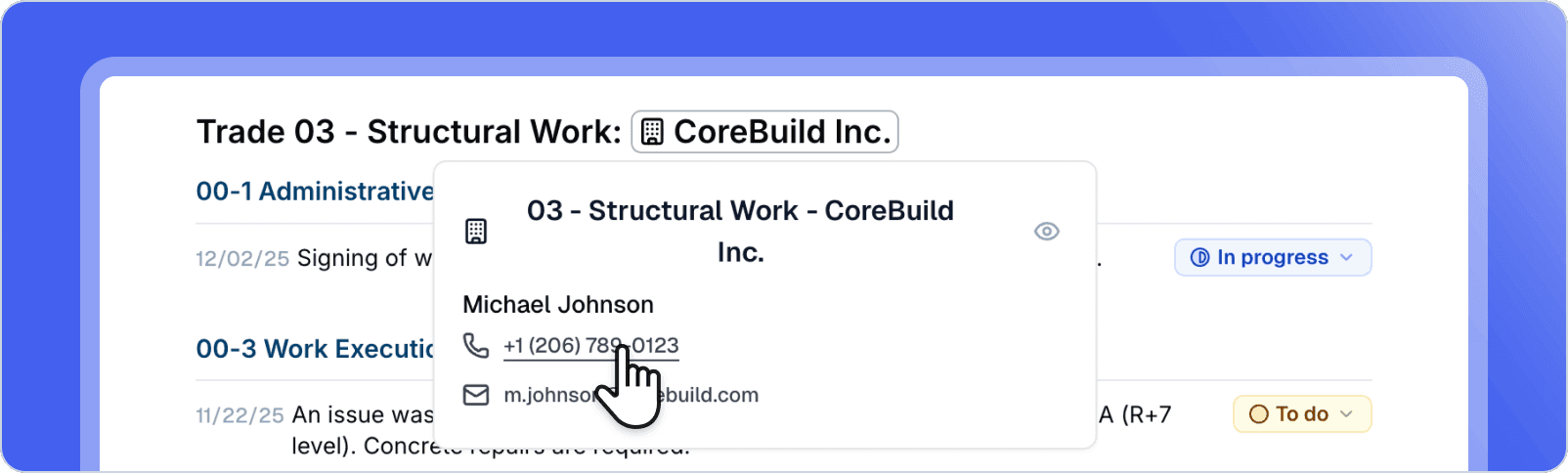
Document read notification
Receive an email notification when an identified recipient reads your shared document for the first time. Know instantly when your reports are viewed, allowing you to follow up proactively.Perfect for following up at the right time with companies or contacts who haven’t yet reviewed your important documents.Navigation architecture redesign
New navigation architecture inspired by best design practices. The interface adopts a more modern style with better visual continuity: the navigation bar takes on the background color to create a more immersive experience, and the main page is highlighted in an elegant white frame.Redesigned navigation for a smoother and more professional user experience.Improvements
Improvements
Fixes
Fixes
Automatically saved email drafts
No more risk of losing your content when sharing via email. Your email content is now automatically saved as a draft, even if you close the sharing window.A visual indicator on the share button shows you that a draft is in progress. You can resume writing your email at any time exactly where you left off, just like in Linear or Gmail.Faster than ever Word and PDF import with AI
Transform your Word and PDF documents into structured notes in seconds. Simply import your file into the AI assistant and ask it to create a formatted note. The AI analyzes your document and automatically converts it while preserving structure, headings, and content.No more tedious copy-pasting and manual reformatting. Whether it’s a client report, meeting minutes, or technical document, the AI understands your document structure and generates a perfectly formatted note. This feature significantly accelerates migrating your existing documents to There.PDF compression optimization
The quality of your PDF exports is significantly improved. Images now maintain optimal sharpness while keeping a reasonable file size. Smart compression preserves important details like text in screenshots.The compression algorithm balances visual quality and file size to deliver professional PDFs without compromising readability. Your large documents with many images now export with quality comparable to the best tools on the market.Improvements
Improvements
Fixes
Fixes
Table formatting
Enhance the presentation of your tables with new formatting options. You can now merge cells to create column or row headers, making it easier to structure complex and professional tables.Row and column headers help clearly organize your data and improve table readability, whether for financial reports, schedules, or comparative analyses. The intuitive interface provides quick access to these options through a contextual menu when selecting cells.Automatic Email Reminders
Optimize tracking of your shared documents with an automated reminder system. Configure reminders when sharing documents and manually trigger follow-ups for recipients who haven’t viewed your reports. Reminder emails use a professional template to maintain consistent communication.Improvements
Improvements
Fixes
Fixes
Image zoom in galleries
View your images in full screen with a simple click. When you click on a thumbnail in a gallery, the image displays in large format for better detail visibility. This feature is available in both the editor and public document view, as well as on mobile.Easily navigate between images in your gallery in enlarged mode and close the view with one click to return to your document.Advanced Table Formatting
Further customize your tables with new formatting options. Change the background color of individual cells to highlight important data. Apply text formatting (bold, italic, color) to row and column headers. Align text in bulk across multiple cells by selecting an entire row or column.These improvements allow you to create more visual and professional tables, similar to what you could do in Excel or Notion.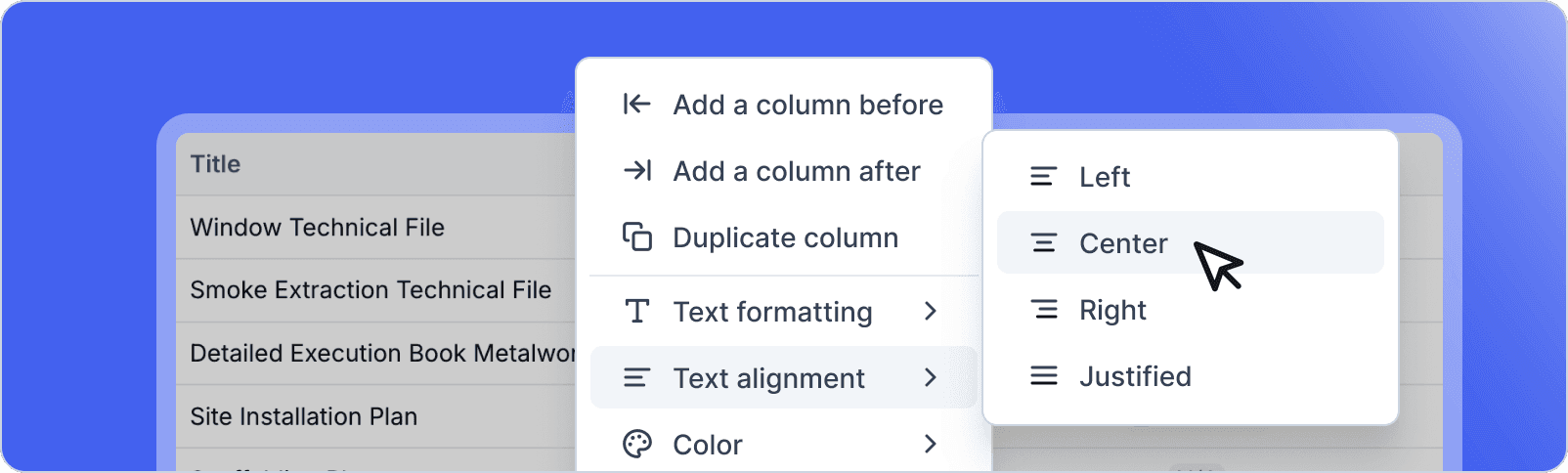
Improvements
Improvements
Fixes
Fixes
Comments on documents
Collaborate more effectively with the new comments feature. Add comments directly on any block in your document or select specific text to comment. Comments appear in real-time for all collaborators.Users can create discussion threads by replying to existing comments, facilitating contextual exchanges. Each comment displays the author and timestamp, enabling clear conversation tracking. This feature enhances asynchronous collaboration and centralizes feedback directly within your documents.Subtasks with indentation
Organize complex tasks by creating up to three indentation levels. Each subtask maintains its own dates, statuses, and properties independently from the parent task, unlike simple checklists.This hierarchical structure allows breaking down large projects into actionable items while maintaining a clear overview. Subtasks can be collapsed or expanded for better readability.Planned and actual dates for tasks
Track your project progress precisely with five date types: creation date, planned start date, due date, actual start date, and actual completion date. Actual dates are automatically filled when status changes to “In Progress” or “Done”.All dates remain manually editable to adapt to unforeseen circumstances. A new history in the task context menu traces all status changes with their associated dates, providing complete traceability of each task’s evolution.Improvements
Improvements
Fixes
Fixes
Home page redesign
The home page gets a fresh new look for a smoother and more intuitive experience. Instantly access your recent documents, create a new document with one click, and easily find files shared with you.Direct links to the mobile app and plugin are now visible, allowing you to extend your use of There across all your devices. This redesign simplifies your daily navigation and focuses on what really matters: your content.Attendance Block: Simplified Management and New Status
The attendance block evolves to save you valuable time. A new “Apply to all” button automatically assigns the distribution label to all contacts with a single click. You can then manually deselect contacts who aren’t concerned, an approach much faster than checking each contact individually.The block also now includes a new “Late” status with automatic counting, just like absences. This feature is particularly useful for tracking construction site meetings or any event requiring precise punctuality monitoring. The cumulative late count is displayed directly, allowing you to quickly identify trends.Improvements
Improvements
Fixes
Fixes
Templates for your new documents
Start your projects quickly with custom templates and ready-to-use examples. When creating a new document, access your template library to start from a structure already configured to your needs.Each template retains its formatting, blocks, and organization, saving you valuable time by avoiding recreating the same structure each time. Pre-configured examples inspire and guide you to discover the application’s possibilities.Usage statistics for your templates are automatically updated, allowing you to identify your most-used templates. Document duplication is streamlined to quickly create new personalized versions, and document rows adapt to each user for an optimal experience.Improvements
Improvements
Fixes
Fixes
Quantity block
Track your numerical indicators precisely with the new quantity block. Whether counting on-site personnel, financial amounts, or any other quantitative data, this block displays your values as proportional bars.Bars adjust automatically: the element with the maximum value occupies 100% of the width, others scale proportionally. You can customize the unit of measurement (people, euros, etc.) and enable statistics to visualize the total sum at a given date. The block easily copies to Excel or other tools while maintaining its structure.GPT-5 support
There now integrates GPT-5, OpenAI’s new model that offers significantly improved reasoning and content generation capabilities. Enjoy even more powerful AI assistance to write, synthesize, and structure your documents.GPT-5 brings better context understanding and more accurate results for all your content generation requests. The model is directly accessible in the writing interface with the same commands as before.Improvements
Improvements
Fixes
Fixes
Meeting Attendance Block
Efficiently manage attendance for your meetings with this new dedicated block. Record complete information about your participants: role, company represented, contact details including email and phone number.For each meeting, quickly mark each participant’s status (present, absent, late, excused), manage the distribution list and invitations for the next session. Integrated statistics allow you to track cumulative absences and tardiness. The interface intelligently adapts by hiding contact buttons when no information is provided.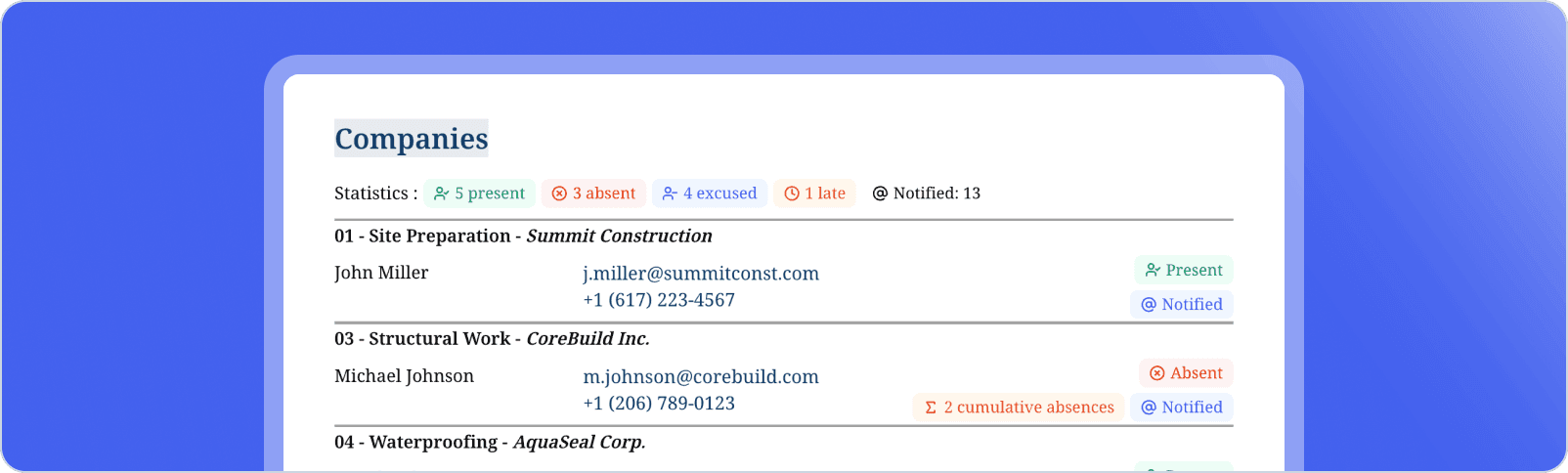
Enhanced Voice Notes
Access the original written notes after transcribing your voice notes. This feature allows you to return to the raw text generated by transcription, making it easier to verify and edit your voice content.Improvements
Improvements
Fixes
Fixes
Smart suggestions when sharing
Save time when sharing your documents via email with intelligent suggestions. The system automatically suggests relevant contacts based on two sources:- Your contacts saved in There appear directly in the suggestions
- Document duplication and sharing history helps you quickly find your usual recipients
Web and Mobile Onboarding
Discover There from your first connection with an intuitive welcome flow, available on both web and mobile. The new onboarding guides you through essential features, allowing you to get started with the app quickly and effectively.This adaptive journey presents There’s key concepts and helps you create your first document in just a few simple steps, regardless of the platform you’re using.Improvements
Improvements
Fixes
Fixes
Custom labels
Save time by creating your own reusable labels. Type@ followed by your label name to instantly insert it into your documents. These labels can be project statuses (pending, approved, submitted), progress states (to do, in progress, completed), or any other recurring element in your workflow.Create and manage your labels directly from the input menu: choose a name and color for easy visual identification. Labels integrate naturally into your tables and documents, allowing you to standardize your processes without retyping. They automatically sync across your organization.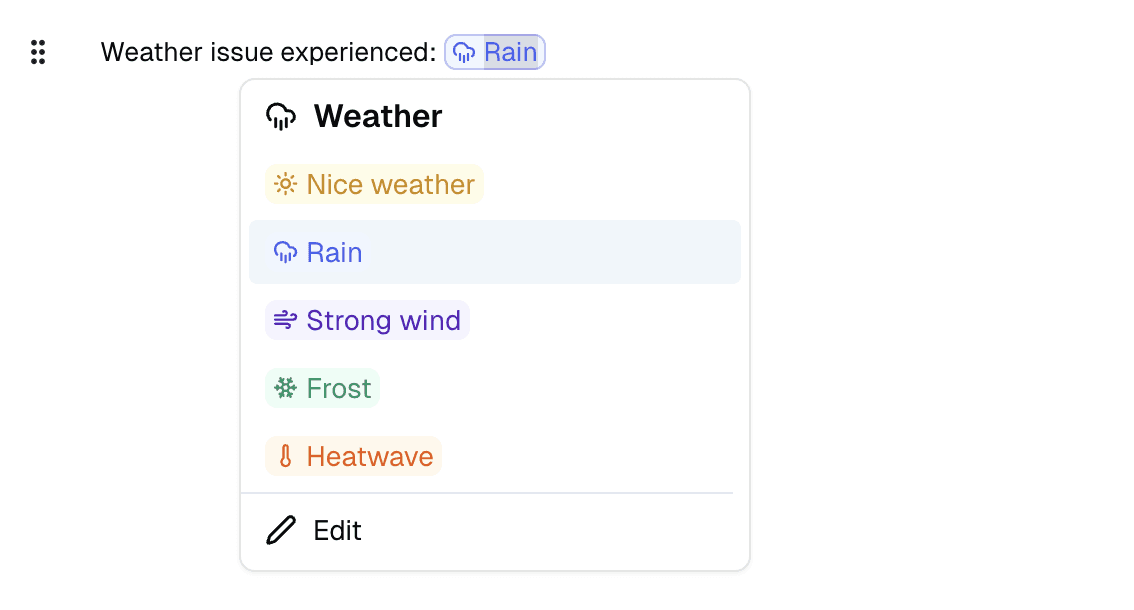
Improvements
Improvements
Fixes
Fixes
Multi-provider AI and smart generation
Choose your preferred artificial intelligence provider. There’s AI adapts to your needs with the ability to select different providers based on your preferences and use cases.The AI system better understands your tasks and can now directly generate your business blocks: tasks, tables, meetings, and other structured elements. Extended support for different file formats allows the AI to work with more document types to assist you in your writing. This feature is available from the Pro plan.Quick date insertion
Type @date in your documents to bring up a mini-calendar and quickly insert a date. This feature simplifies planning and note-taking during meetings or reports.Improvements
Improvements
Fixes
Fixes
Table of contents customization
Adapt the table of contents display to your needs with the new depth setting. You can now choose to display only level 1 headings (H1), levels 1 and 2 (H1, H2), or all three levels (H1, H2, H3) by default.The setting is accessible directly from the table of contents toolbar and applies instantly. This option helps simplify navigation in long documents by focusing on main sections, while keeping the ability to show all heading levels when needed.Improvements
Improvements
Fixes
Fixes
Voice Notes on Mobile
Record audio notes directly from your mobile device. You can now capture your thoughts vocally while on the move, with automatic transcription that instantly converts your speech into AI-enhanced text.Recording continues even when the app is in the background or the screen is locked, allowing you to take hands-free notes. If you’ve already started writing text or added photos to your note, these elements will be intelligently integrated to enrich and improve the AI-generated note.Your original note remains always accessible, allowing you to consult the raw content before processing if needed.Improvements
Improvements
Fixes
Fixes
Full-screen notes
View your notes immersively with the new full-screen display. Whether you’re reviewing your own notes from the app or browsing publicly shared notes, enjoy an optimal reading experience without distractions.The interface has been completely redesigned to offer smooth and intuitive navigation. The full-screen view replaces the old modal, allowing you to focus entirely on your note content. This improvement benefits both organization members and external readers viewing your shared documents.Improvements
Improvements
Fixes
Fixes